
RRP: N/A
Your Price: N/A
Mfr. Part #: LH65WAFWLGCXEN*TMF3980
Our Part #: SMWA65FPEERINT
Description
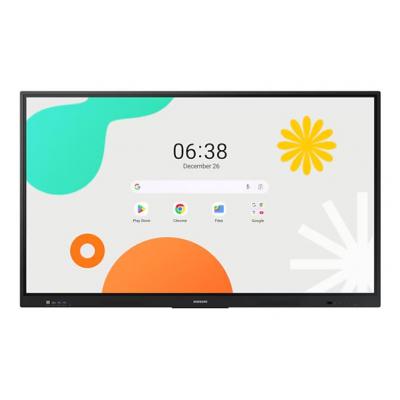
SMWA65F
Unlimited Learning Possibilities
The interactive display WAF series, powered by Android OS, enhances education with Google services and a seamless annotation function. Instantly take notes at any moment and empower students to collaborate independently in separate zones, ushering in a new era of interactive education.
An intuitive UX that fits your needs
Powered by Android™
The WAF series offers familiarity to its users. It's compatible with other Android devices and provides a variety of widgets and an easily customizable home screen. These features create more flexibility in building an environment that suits various learning needs.
Effortless access to Google services
EDLA Certification
With an EDLA certification, the WAF series supports a variety of Google services like Google Play and YouTube. This access to major educational apps like Google Classroom leads to increased efficiency and enhanced communication with students.
Take notes instantly, anywhere on the screen
Annotation On
The WAF series lets users take notes anytime with a simple press of the always-visible Annotation button. Whether watching a video or viewing any content, users can seamlessly annotate without interruptions, avoiding the need to capture images first and enhancing productivity.
Write independently, learn together
Split Note Mode
The upgraded Note app allows up to four independent note zones on a single page, enabling multiple students to use the whiteboard simultaneously. Students can work in their own zones without affecting others, fostering both collaboration and individual learning.
Display multiple screens simultaneously
Easy Multitasking
The split screen and multi-window, enable teachers to easily display information and multitask at the same time on the WAF series. This flexibility provides convenient access to all the screens required to create engaging learning environments.
Smart, wireless sharing on multiple devices
Powerful Screen Sharing
The WAF series supports screen mirroring for up to nine devices, increasing student engagement. This feature ensures every student is included and engaged as content can be shared on both the large display and individual devices. It can be used on iOS, Mac, Windows, Android, or Chrome OS.
Better interaction with best-in-class multi-touch
Multi-point touch drawing
Multiple users can write and draw on the whiteboard at the same time with the display’s advanced multi-touch capabilities. Up to 40 simultaneous touchpoints are possible, allowing large groups of students and teachers to collaborate and learn together in a fun and natural way.
Switch pens without changing settings
Dual Pen
The dual pen function enables the use of two different writing tools with no downtime. With the double-sided nib applied, users can effortlessly switch between two different colors on the front and back side of the pen – without needing to change the settings or interrupt the flow of the lesson.
• Powered by Android™ & EDLA Certification - Google EDLA certification promotes interactive learning with a variety pre-installed and downloadable Google services.
• Powerful Performance - A powerful octa-core CPU delivers smooth performance across any application.
• Split Note Mode - Up to 4 students can work in their own zones without affecting others, fostering both collaboration and individual learning.
PEERINTERACTIVE
*THE PRODUCT IS EXCLUSIVE TO MIDWICH*
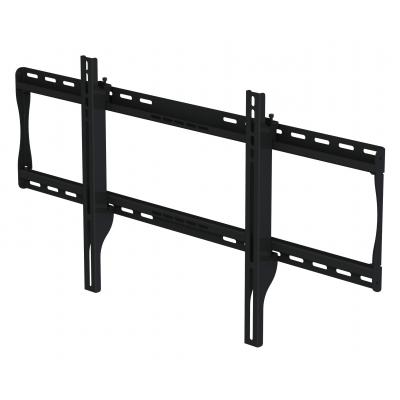
The SmartMount® Universal Flat Wall Mount series offers the most versatile installation features and mounting options. Horizontal and vertical adjustment abilities allow for post installation leveling and side-to-side positioning, making it easier than ever to find the perfect TV position. The TMF3980 models’ low-profile design offers a sleek appearance, whilst still ensuring sufficient ventilation and connectivity space. The open wall plate design offers total wall access, increasing the electrical and cable management options. The display can now simply be installed by a single person with the Hook-and-Hang™ system. The Easy-Glide™ adaptors hook onto the wall plate for an overall quick, simple, and secure installation.
• Universal mount fits displays with mounting patterns up to 824 x405mm (32.44" W x 15.95" H)
• Touchscreen compatible design holds display 2" (50mm) from the wall
• Up to 0.25" (6mm) of vertical adjustment on each universal display adaptor bracket for post-installation leveling and height adjustment fine-tuning
• Horizontal display adjustment up to 8.00" (203mm) for centeringdisplay on wall
• Mounts to wood studs, concrete,cinder block or metal studs (metal stud accessory required)
• Includes all necessary wall and display attachment hardware
• Design is UL tested to four times stated load capacity
SMWA65F
Unlimited Learning Possibilities
The interactive display WAF series, powered by Android OS, enhances education with Google services and a seamless annotation function. Instantly take notes at any moment and empower students to collaborate independently in separate zones, ushering in a new era of interactive education.
An intuitive UX that fits your needs
Powered by Android™
The WAF series offers familiarity to its users. It's compatible with other Android devices and provides a variety of widgets and an easily customizable home screen. These features create more flexibility in building an environment that suits various learning needs.
Effortless access to Google services
EDLA Certification
With an EDLA certification, the WAF series supports a variety of Google services like Google Play and YouTube. This access to major educational apps like Google Classroom leads to increased efficiency and enhanced communication with students.
Take notes instantly, anywhere on the screen
Annotation On
The WAF series lets users take notes anytime with a simple press of the always-visible Annotation button. Whether watching a video or viewing any content, users can seamlessly annotate without interruptions, avoiding the need to capture images first and enhancing productivity.
Write independently, learn together
Split Note Mode
The upgraded Note app allows up to four independent note zones on a single page, enabling multiple students to use the whiteboard simultaneously. Students can work in their own zones without affecting others, fostering both collaboration and individual learning.
Display multiple screens simultaneously
Easy Multitasking
The split screen and multi-window, enable teachers to easily display information and multitask at the same time on the WAF series. This flexibility provides convenient access to all the screens required to create engaging learning environments.
Smart, wireless sharing on multiple devices
Powerful Screen Sharing
The WAF series supports screen mirroring for up to nine devices, increasing student engagement. This feature ensures every student is included and engaged as content can be shared on both the large display and individual devices. It can be used on iOS, Mac, Windows, Android, or Chrome OS.
Better interaction with best-in-class multi-touch
Multi-point touch drawing
Multiple users can write and draw on the whiteboard at the same time with the display’s advanced multi-touch capabilities. Up to 40 simultaneous touchpoints are possible, allowing large groups of students and teachers to collaborate and learn together in a fun and natural way.
Switch pens without changing settings
Dual Pen
The dual pen function enables the use of two different writing tools with no downtime. With the double-sided nib applied, users can effortlessly switch between two different colors on the front and back side of the pen – without needing to change the settings or interrupt the flow of the lesson.
• Powered by Android™ & EDLA Certification - Google EDLA certification promotes interactive learning with a variety pre-installed and downloadable Google services.
• Powerful Performance - A powerful octa-core CPU delivers smooth performance across any application.
• Split Note Mode - Up to 4 students can work in their own zones without affecting others, fostering both collaboration and individual learning.
PEERINTERACTIVE
*THE PRODUCT IS EXCLUSIVE TO MIDWICH*
The SmartMount® Universal Flat Wall Mount series offers the most versatile installation features and mounting options. Horizontal and vertical adjustment abilities allow for post installation leveling and side-to-side positioning, making it easier than ever to find the perfect TV position. The TMF3980 models’ low-profile design offers a sleek appearance, whilst still ensuring sufficient ventilation and connectivity space. The open wall plate design offers total wall access, increasing the electrical and cable management options. The display can now simply be installed by a single person with the Hook-and-Hang™ system. The Easy-Glide™ adaptors hook onto the wall plate for an overall quick, simple, and secure installation.
• Universal mount fits displays with mounting patterns up to 824 x405mm (32.44" W x 15.95" H)
• Touchscreen compatible design holds display 2" (50mm) from the wall
• Up to 0.25" (6mm) of vertical adjustment on each universal display adaptor bracket for post-installation leveling and height adjustment fine-tuning
• Horizontal display adjustment up to 8.00" (203mm) for centeringdisplay on wall
• Mounts to wood studs, concrete,cinder block or metal studs (metal stud accessory required)
• Includes all necessary wall and display attachment hardware
• Design is UL tested to four times stated load capacity
| Features | |
|---|---|
| Screen Size | 65 Inch |
| Colour | Black |
| Resolution | 3,840 x 2,160 |
| Contrast ratio (typical) | 1,200:1 |
| Display brightness | 400 cd/m2 |
| Response time | 8 ms |
| Maximum operating temperature range (T-T) | 0 - 40 |
| Compatible with VESA-wall mounting system | 600 x 400 mm |
| Dimensions W x D x H | 1482.1 x 87.7 x 897.5 mm |
| Weight | 36.2 Kg |