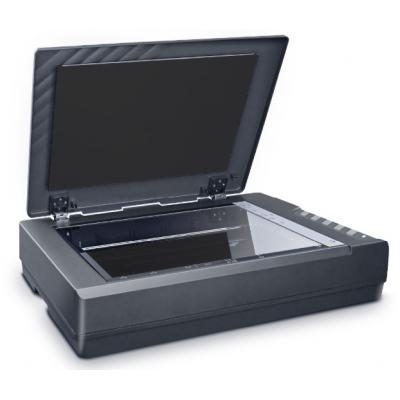

RRP: £1,029.00
Your Price: N/A
Mfr. Part #: 0326
Our Part #: PLUS6548
Description
An Effortless Solution for A3 Large Format Scanning
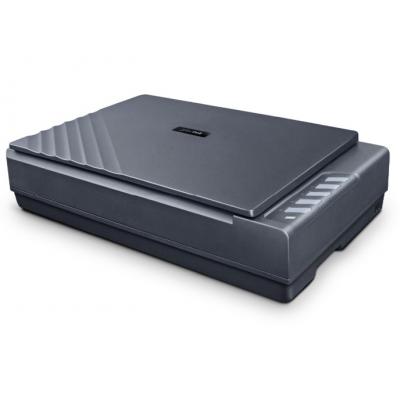
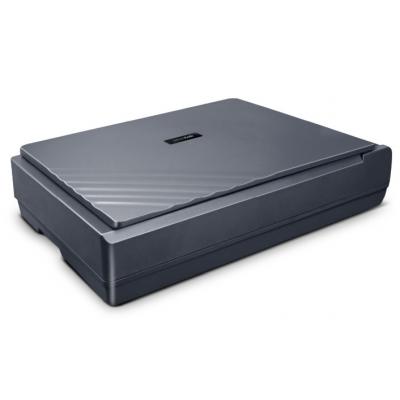
The OpticPro A390 is designed for high-quality scanning of artworks, photos, painting albums, books, artwork and other large document items up to 304.8 mm x 431.8 mm in size.
Complete Flat Design for Versatile, High-Speed Document Handling
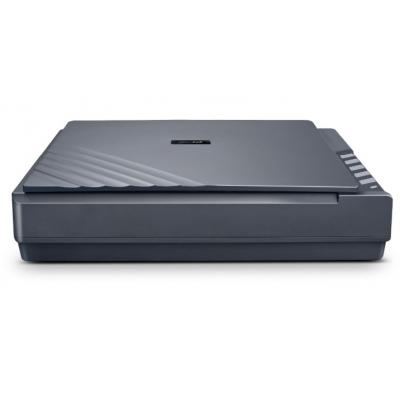
The full-flat scanning surface eliminates gaps or recessed areas between the glass and control panel, allowing seamless scanning of oversized originals beyond A3 size. With an impressive scan speed of under 1.75 seconds per page, the scanner delivers exceptional productivity for demanding workflows such as offices, libraries, studios, and service bureaus.
Whether it's a large blueprint, bound material, or delicate artwork, the flat layout ensures consistent contact, distortion-free scanning, and hassle-free handling for items extending beyond the glass area.
Auto Cover Detection
With Auto Cover Detection, the scanner automatically recognizes when the lid is closed and instantly starts scanning. No buttons to press. No repeated steps. No wasted time. Simply place your document, close the lid, and the scan is completed automatically.
Effortless Lift, Perfect Balance
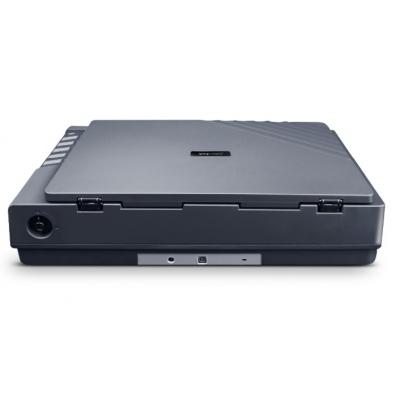
OpticPro A390 has a reinforced hinge mechanism that allows the cover to stay securely between 40 and 70 degrees. Users can easily control the lid angle with smooth movement and stable positioning, without rebound or extra effort.
Unlike conventional flatbed scanners that require lifting and holding the lid open, the OpticPro A390 delivers a lighter, safer, and more comfortable scanning experience. Its effortless operation reduces physical strain during high-volume scanning and improves workflow efficiency. Plustek's exclusive hinge design enhances everyday usability while ensuring long-term durability.
Anti-Slip & Anti-Misalignment Design
The OpticPro A390 is engineered with an advanced document retention system that keeps papers securely in place throughout the entire scanning process. Even when the cover is lifted, documents remain firmly positioned and do not slide out through the rear gap.
This refined structural design also helps maintain proper alignment between the document and the scanning area. It effectively prevents skewed images and unwanted white edges caused by slight positioning shifts. As a result, every scan stays clean, accurate, and perfectly aligned.
Modes for Optimal Scanning
The OpticPro A390 features selectable single and dual light source modes, allowing illumination to be adapted to different scanning objects. This flexible lighting control delivers consistent, professional-quality results across a wide range of materials.
• Single Light Source Mode
Switch to Single Light Source Mode when scanning textured or three-dimensional materials. Directional lighting highlights surface details and reveals depth in fabrics, embossed documents, coins, and artwork.
• Dual Light Source Mode
Select Dual Light Source Mode for standard document digitization. Balanced illumination reduces shadows and produces clean, sharp, evenly lit scans ideal for everyday business use.
• Built for Versatile Scanning
From archival preservation to routine office scanning, the OpticPro A390 supports diverse workflows with flexible lighting control designed for professional environments.
One-Touch Buttons
Personalize your scanning workflow with customizable scan to buttons that instantly send documents to the destination you choose.
Whether you need to scan to email, local folders, network drives, cloud storage, business software, or OCR and PDF workflows, each button can be preset to perform a complete task with a single press. This design reduces manual steps, minimizes errors, and delivers consistent results for both individual users and shared office environments.
Automatic Image Enhancement
Transform raw scans into clean, polished, and ready-to-use results automatically.
The built-in image enhancement engine intelligently analyzes each document and applies the optimal corrections without manual editing. From punch-hole removal, page merge, auto-rotation, dot removal, cropping, to color and tone adjustments, every scan comes out clear, sharp, and professional.
An Effortless Solution for A3 Large Format Scanning
The OpticPro A390 is designed for high-quality scanning of artworks, photos, painting albums, books, artwork and other large document items up to 304.8 mm x 431.8 mm in size.
Complete Flat Design for Versatile, High-Speed Document Handling
The full-flat scanning surface eliminates gaps or recessed areas between the glass and control panel, allowing seamless scanning of oversized originals beyond A3 size. With an impressive scan speed of under 1.75 seconds per page, the scanner delivers exceptional productivity for demanding workflows such as offices, libraries, studios, and service bureaus.
Whether it's a large blueprint, bound material, or delicate artwork, the flat layout ensures consistent contact, distortion-free scanning, and hassle-free handling for items extending beyond the glass area.
Auto Cover Detection
With Auto Cover Detection, the scanner automatically recognizes when the lid is closed and instantly starts scanning. No buttons to press. No repeated steps. No wasted time. Simply place your document, close the lid, and the scan is completed automatically.
Effortless Lift, Perfect Balance
OpticPro A390 has a reinforced hinge mechanism that allows the cover to stay securely between 40 and 70 degrees. Users can easily control the lid angle with smooth movement and stable positioning, without rebound or extra effort.
Unlike conventional flatbed scanners that require lifting and holding the lid open, the OpticPro A390 delivers a lighter, safer, and more comfortable scanning experience. Its effortless operation reduces physical strain during high-volume scanning and improves workflow efficiency. Plustek's exclusive hinge design enhances everyday usability while ensuring long-term durability.
Anti-Slip & Anti-Misalignment Design
The OpticPro A390 is engineered with an advanced document retention system that keeps papers securely in place throughout the entire scanning process. Even when the cover is lifted, documents remain firmly positioned and do not slide out through the rear gap.
This refined structural design also helps maintain proper alignment between the document and the scanning area. It effectively prevents skewed images and unwanted white edges caused by slight positioning shifts. As a result, every scan stays clean, accurate, and perfectly aligned.
Modes for Optimal Scanning
The OpticPro A390 features selectable single and dual light source modes, allowing illumination to be adapted to different scanning objects. This flexible lighting control delivers consistent, professional-quality results across a wide range of materials.
• Single Light Source Mode
Switch to Single Light Source Mode when scanning textured or three-dimensional materials. Directional lighting highlights surface details and reveals depth in fabrics, embossed documents, coins, and artwork.
• Dual Light Source Mode
Select Dual Light Source Mode for standard document digitization. Balanced illumination reduces shadows and produces clean, sharp, evenly lit scans ideal for everyday business use.
• Built for Versatile Scanning
From archival preservation to routine office scanning, the OpticPro A390 supports diverse workflows with flexible lighting control designed for professional environments.
One-Touch Buttons
Personalize your scanning workflow with customizable scan to buttons that instantly send documents to the destination you choose.
Whether you need to scan to email, local folders, network drives, cloud storage, business software, or OCR and PDF workflows, each button can be preset to perform a complete task with a single press. This design reduces manual steps, minimizes errors, and delivers consistent results for both individual users and shared office environments.
Automatic Image Enhancement
Transform raw scans into clean, polished, and ready-to-use results automatically.
The built-in image enhancement engine intelligently analyzes each document and applies the optimal corrections without manual editing. From punch-hole removal, page merge, auto-rotation, dot removal, cropping, to color and tone adjustments, every scan comes out clear, sharp, and professional.
EAN # : 4042485080029
| Features | |
|---|---|
| Type | Flatbed Scanner |